Severity needs context.
A technical finding becomes more useful when you can see the asset, the business process and the risk it relates to.
v2.1 THE XRAY-ONE COMMUNITY BUILD
One connected view of cyber resilience. Use the free complete guide to build it yourself on Zoho Creator.
Free guide available now · Creator account required · Optional paid pack coming later
01 / WHAT WE’RE TRYING TO SOLVE
A risk register in one place. Findings in another. Supplier reviews in an inbox. Recovery plans in a shared drive. The pieces exist. The context gets lost between them.
A technical finding becomes more useful when you can see the asset, the business process and the risk it relates to.
Controls, assessments, decisions and actions should remain connected as people and priorities change.
Practitioners should be able to learn the model, inspect the logic and adapt the workflow to their organisation.
02 / ONE CONNECTED OPERATING MODEL
XRAY-ONE links the records that explain your exposure with the decisions and actions that improve your resilience.
INSIDE XRAY-ONE v2.1
Eight views. One connected workspace.
Select a view, then open it to explore the detail.
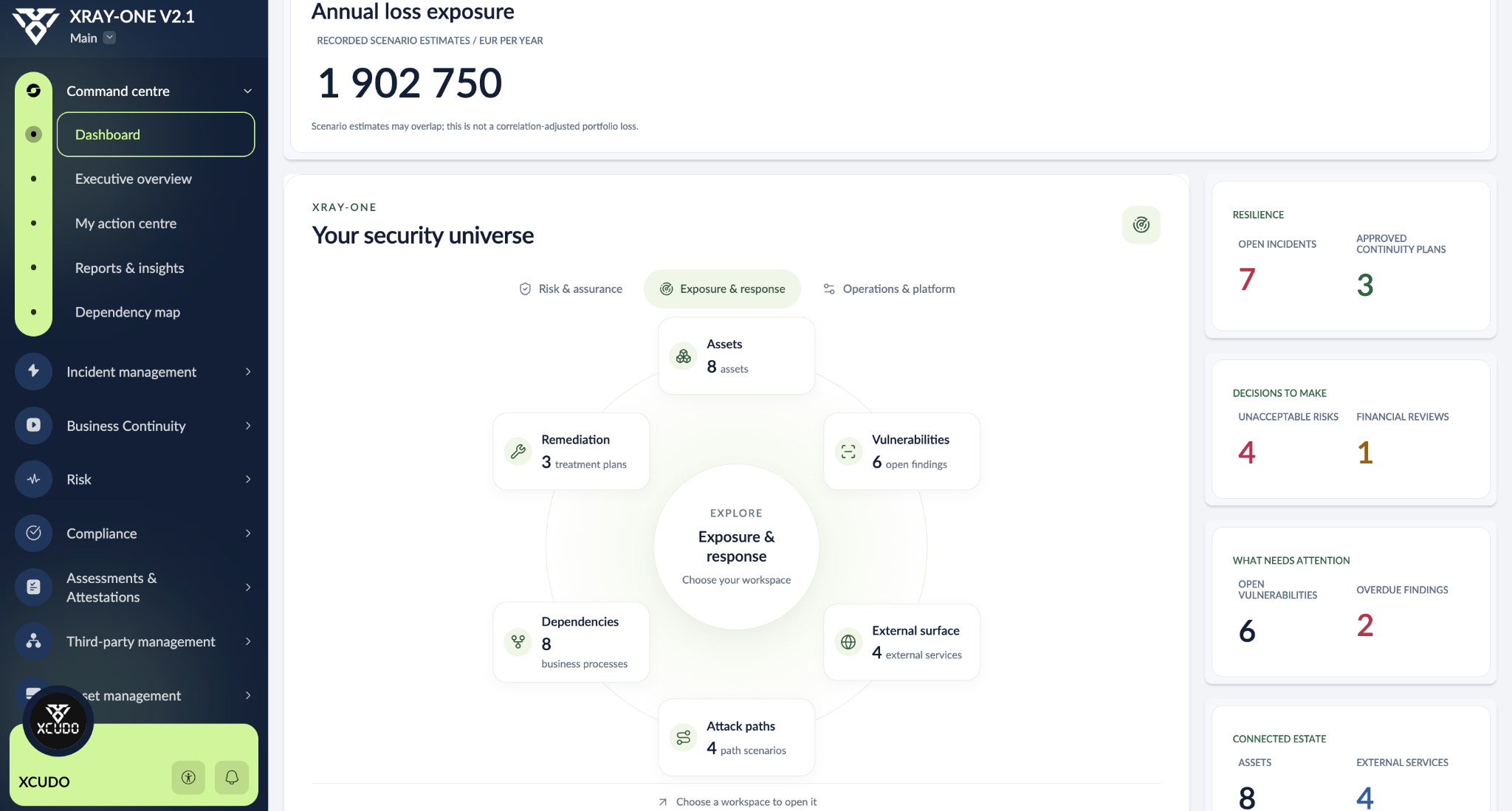
Move between assets, vulnerabilities, external services, dependencies, attack paths and remediation from the command centre.
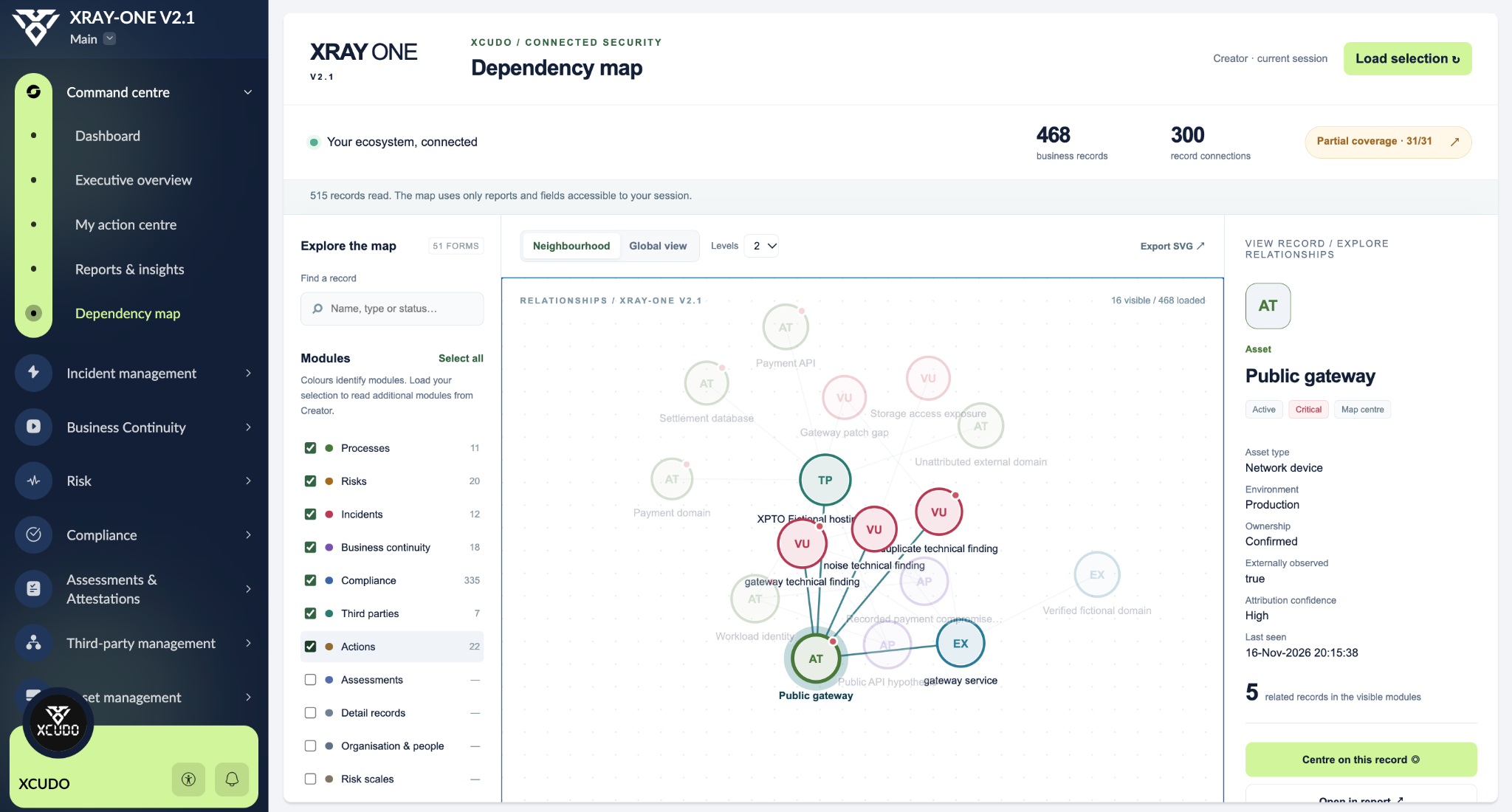
Explore connected records around an asset and inspect its context. The map reflects the records and fields accessible to the current session.
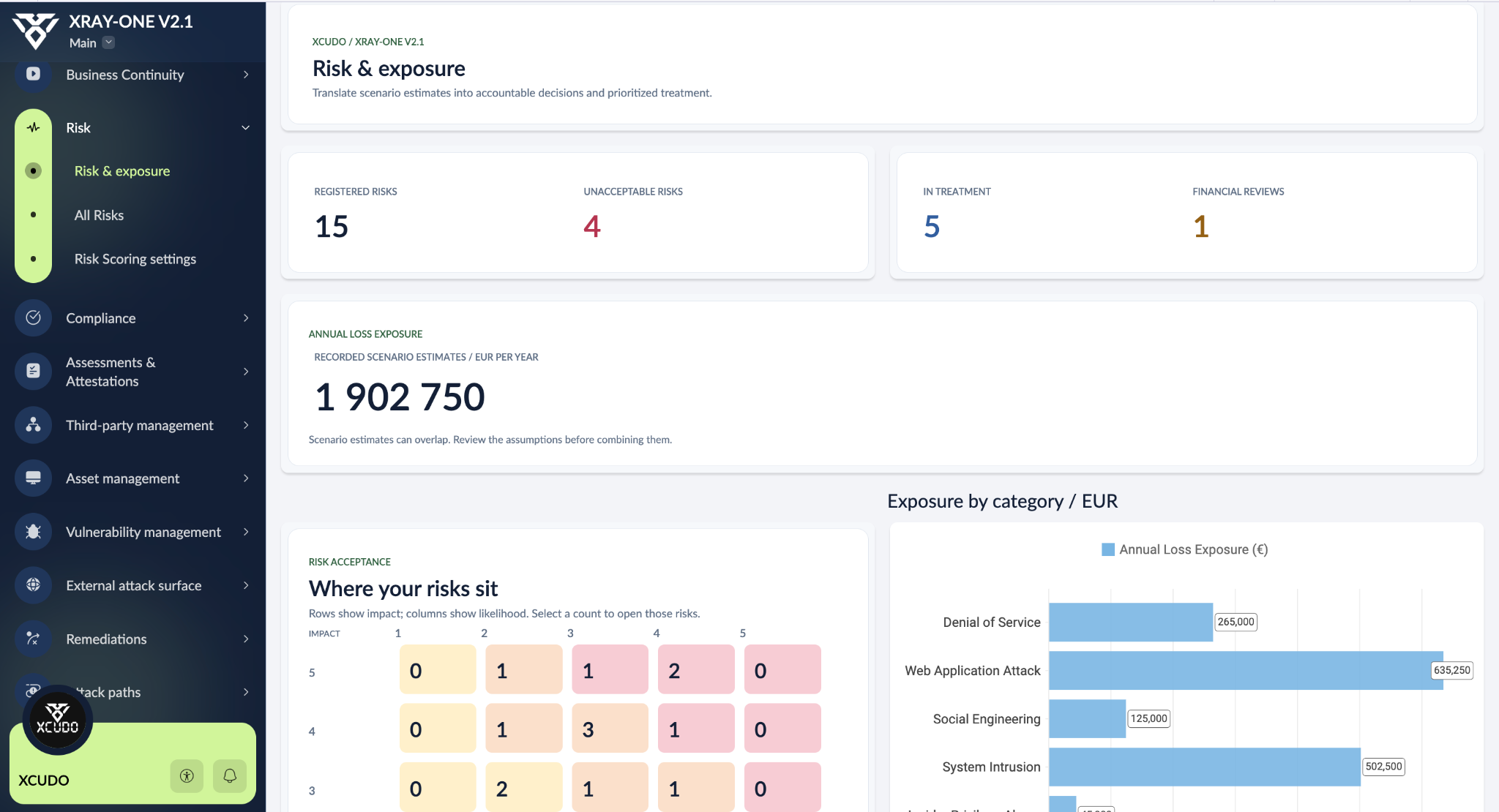
Review recorded scenarios, risk acceptance and annual loss estimates together. Estimates depend on their assumptions and may overlap.
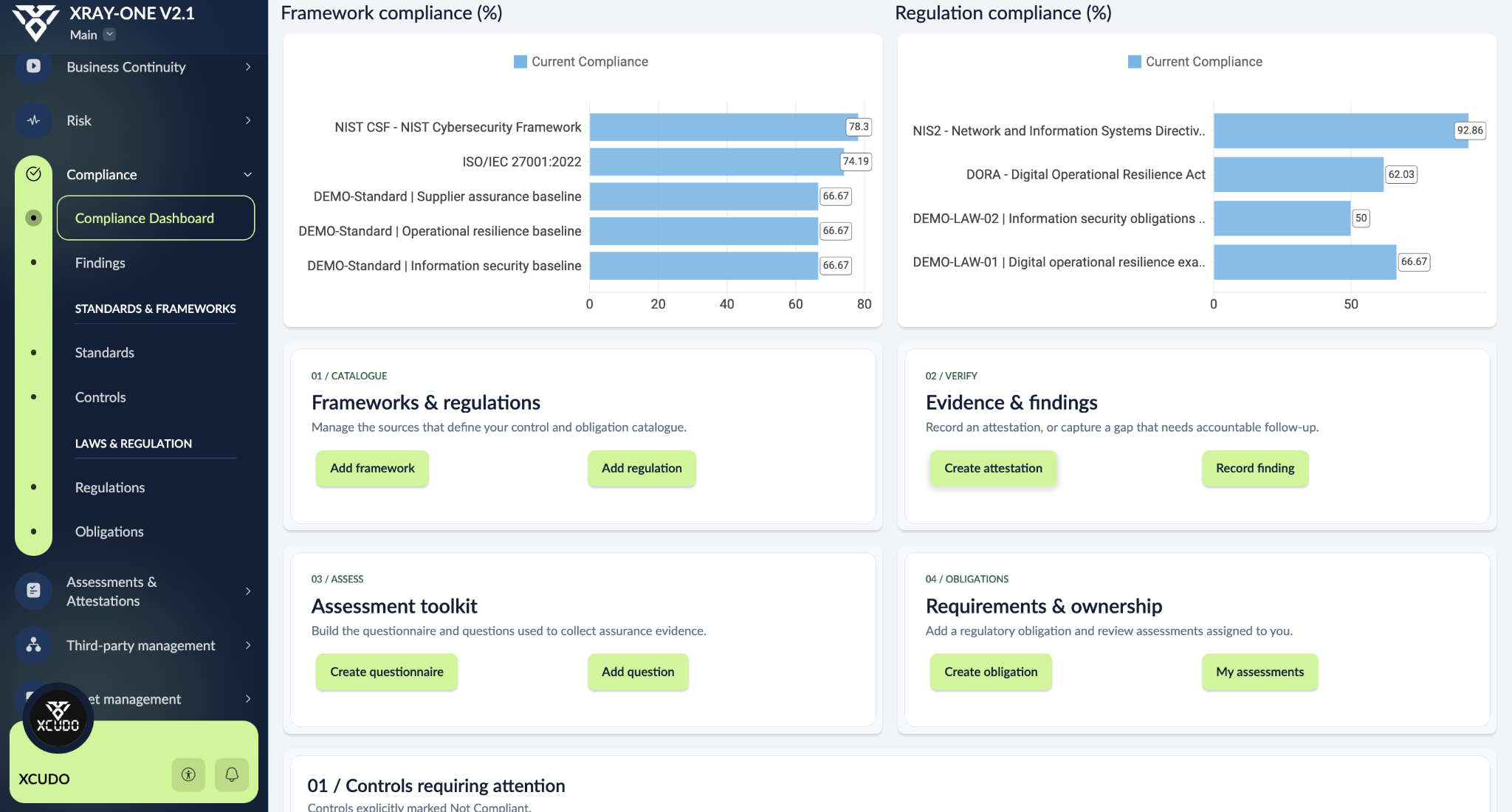
Review framework and regulation mappings, then work with controls, obligations, assessments, evidence and findings.
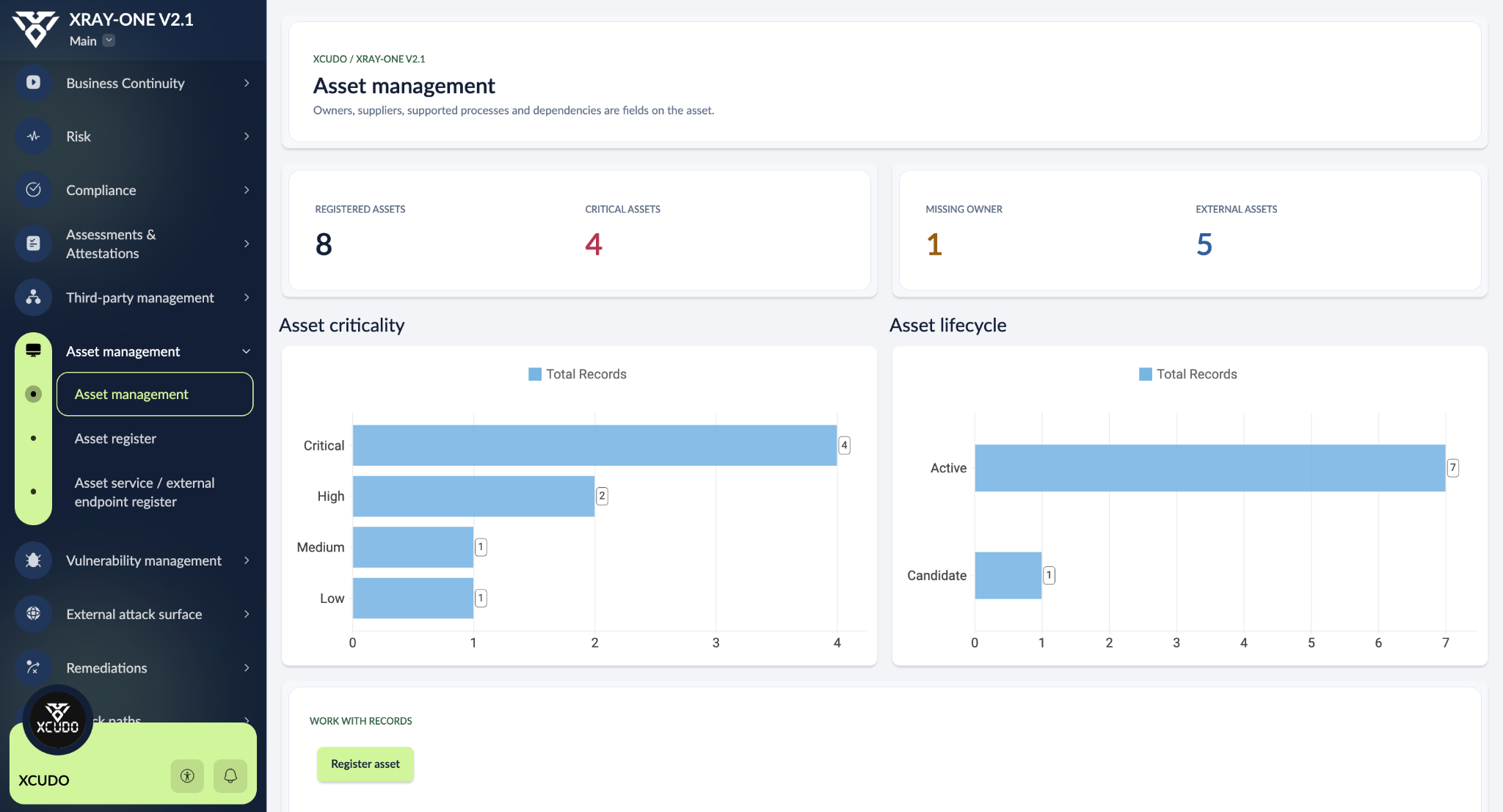
Review asset criticality and lifecycle alongside ownership, supplier, process and service records.
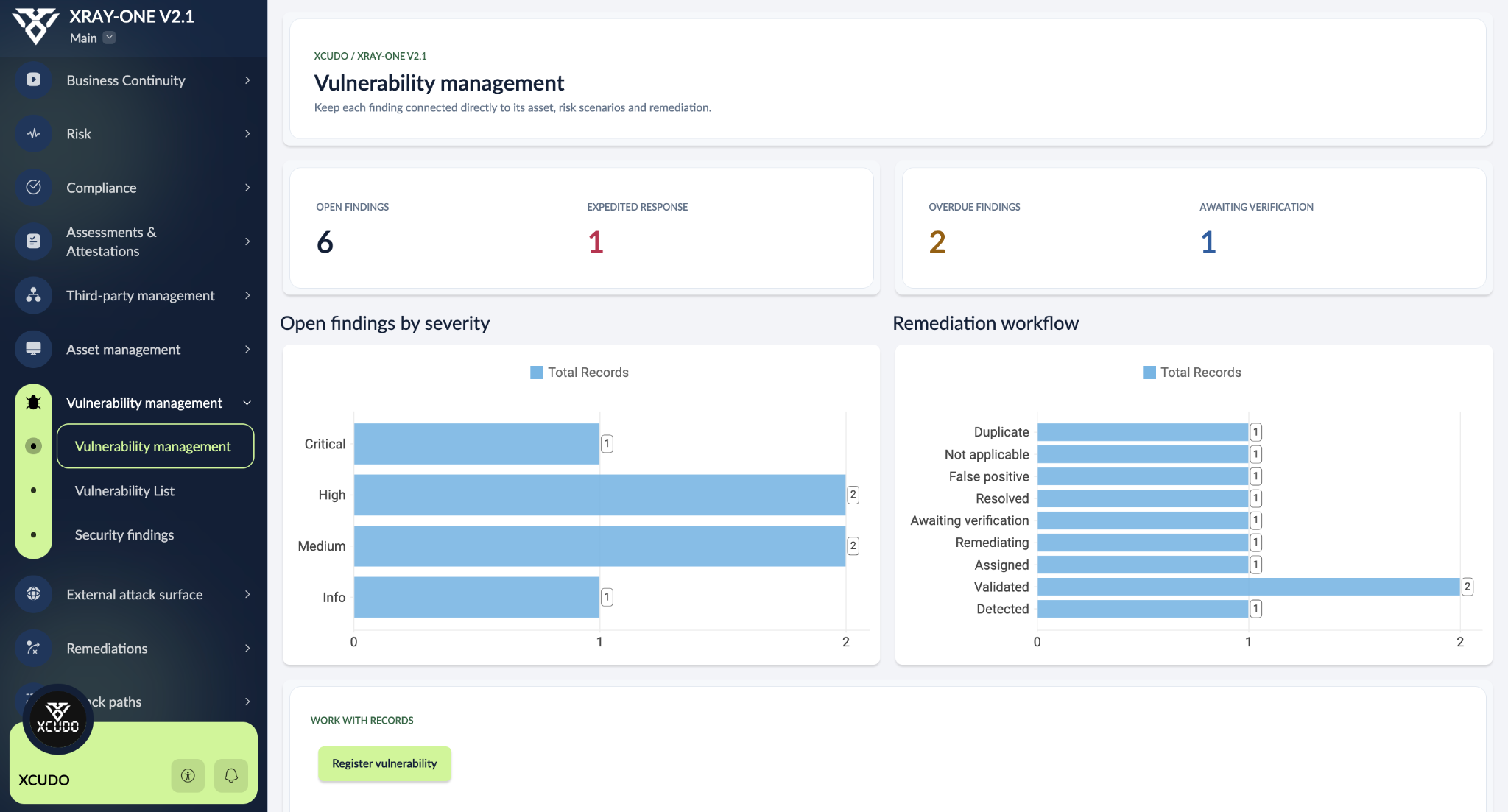
Review severity, overdue findings and workflow state while keeping the finding connected to its asset, risk scenarios and remediation.
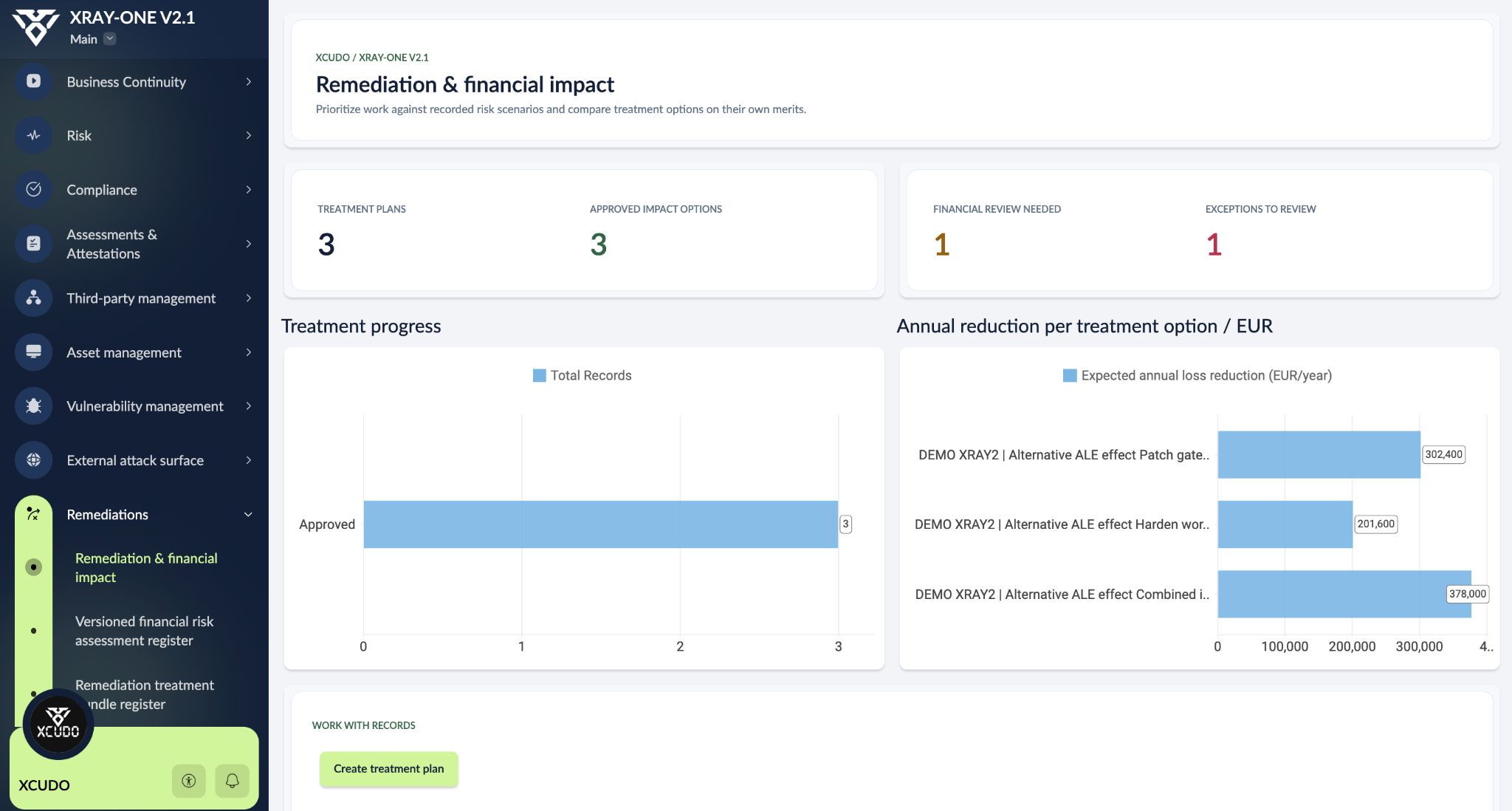
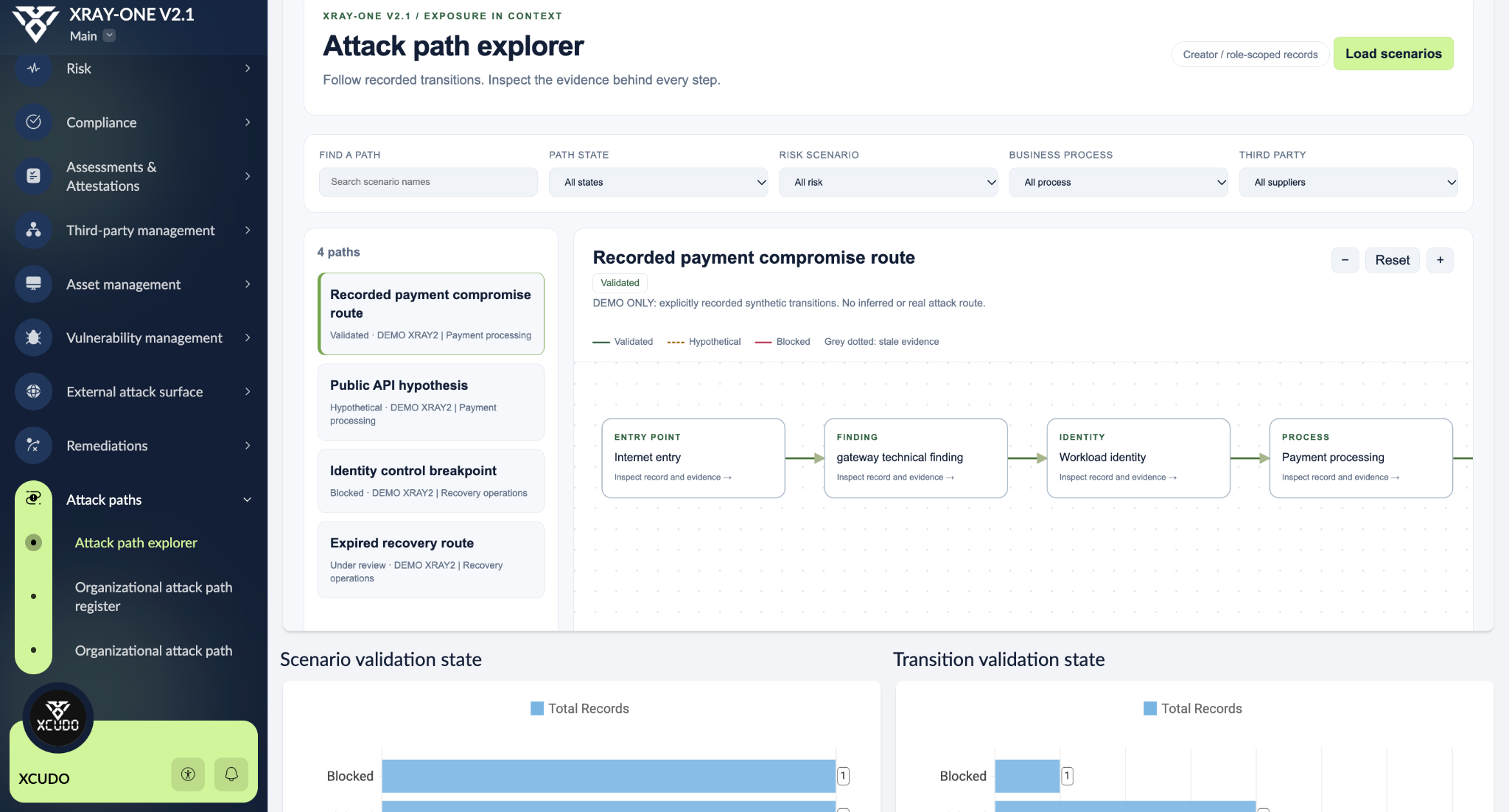
Actual XRAY-ONE v2.1 screens using demonstration data. Figures illustrate the application; they are not customer results.
Understand the context. Act on what matters. Prepare to recover.
Qualitative matrices and annual loss estimates, with versioned assumptions, review, approval and recorded risk decisions.
RISK REGISTER / DECISIONS / LOSS EXPOSUREFramework and law registers, control mappings, obligations, questionnaires, assessments and evidence-linked attestations.
CONTROLS / OBLIGATIONS / EVIDENCESupplier records, accountable owners, due diligence and assessment records connected to the processes they support.
SUPPLIERS / DUE DILIGENCE / OWNERSBusiness and technical ownership, service records, process links and a dependency map that makes relationships visible.
ASSETS / PROCESSES / DEPENDENCIESRecord technical findings against assets, preserve verification evidence, manage exceptions and link findings to risk review.
FINDINGS / EXCEPTIONS / VERIFICATIONDocument identifiers, reachable services, discovery scope and ownership evidence. This edition uses recorded observations; it does not run scans.
IDENTIFIERS / SERVICES / ATTRIBUTIONConnect remediation work to risk treatment, owners, due dates and evidence. Compare treatment cost with documented residual-loss assumptions.
TREATMENT / ACCOUNTABILITY / FOLLOW-THROUGHTrack incident state, severity and event timelines, then record recovery work, root cause and lessons learned.
INCIDENTS / TIMELINES / LESSONSRecord impact assessments and recovery objectives for business processes, making continuity priorities explicit.
BIA / RTO / RPOBuild continuity plans, recovery steps, exercise records and plan activations connected to the affected business context.
PLANS / EXERCISES / RECOVERYMap recorded attack scenarios using nodes, transitions, preconditions and evidence. Distinguish hypotheses from validated transitions.
SCENARIOS / EVIDENCE / ATTACK PATHSExecutive and operational dashboards, orbit navigation, selected-event audit records and configurable notification workflows.
WORKSPACES / AUDIT / NOTIFICATIONSThe community build is a starting point you configure and validate. Scanner ingestion, continuous control testing and autonomous attack simulation are separate capabilities to build or obtain from specialist tools.
03 / WHERE XRAY-ONE FITS
Different technologies solve different problems. Our aim is to make a connected resilience model more accessible and easier to understand.
| Approach | What it brings | How XRAY-ONE fits |
|---|---|---|
| Spreadsheets & documentsManual registers | Flexible starting points for lists, plans and assessments. Linking records and coordinating changes requires your own process. | A shared application model with relationships, workflow logic and connected views in your Creator account. |
| Compliance automationFor example, Vanta [4] | Connected evidence collection and continuous monitoring to support compliance work. | Document controls and assurance alongside risk, exposure and recovery. The community build does not include Vanta-style prebuilt evidence integrations. |
| Enterprise risk platformsFor example, ServiceNow IRM [5] | Broad enterprise risk, policy and compliance workflows on an established enterprise platform. | A learnable, adaptable starting model for teams choosing a build-it-yourself route. Enterprise scale, support and implementation needs still require evaluation. |
| Exposure & scanning toolsFor example, Tenable [6] | Technology to discover and assess technical vulnerabilities and exposure. | Record technical observations and connect them to business risk and treatment. Keep specialist scanning and detection in the tools designed for it. |
| XRAY-ONE on Zoho CreatorThe community build | A free guide, visible application logic and a connected model spanning risk, assurance, technical context and recovery. | You build and maintain the application. A suitable Creator licence and your implementation effort are separate from the free guide. |
An architectural comparison, not a feature-by-feature product evaluation or a claim of equivalence. Vendor capabilities vary by product and plan. Sources reviewed 17 November 2026.
04 / WHY WE BUILD ON ZOHO CREATOR
A security team should be able to shape its own workflows. Creator gives us visual building blocks, programmable logic and platform controls, so we can focus on the model and the way people use it.
These refer to Zoho’s published certification and assurance scope, not certification of XRAY-ONE or your organisation. Review the current certificates, reports, service scope and audit periods. [1]
Build forms, relationships, reports and pages visually. Use Deluge for business rules and workflows. The guide explains what to build and where each piece belongs.
Low code reduces routine development work. Understanding the data model, access rules and testing still matters.
Configure roles and permission sets, record and field access, MFA, session policies and IP restrictions. SAML SSO is available subject to the selected plan or add-on.
Review native audit trails, TLS protection and encryption options. Explicitly enable sensitive-field encryption where needed, and test with real user profiles. [2]
Zoho Cloud supplies the hosted platform. Web and mobile access, APIs and connectors provide building blocks you can configure for your use case.
Select and verify the account region, capacity, backup requirements and feature limits. Integration security and application design remain your responsibility. [2]
Zoho documents a separately deployed Creator On-Premise product for running applications on your infrastructure behind your firewall.
Confirm licensing, feature parity, widget support and migration with Zoho before choosing it. The current XRAY-ONE guide follows Creator Cloud; on-premises compatibility has not been validated. [3]
CREATOR CLOUD
You configure the application, identity, sharing, data handling and integrations.
CURRENT GUIDE ROUTECREATOR ON-PREMISE
Your team also owns hosting, hardening, monitoring, patch deployment, backups and recovery. [7]
SEPARATE EVALUATION REQUIREDPlan availability and your application configuration determine which controls you can use. Platform assurance supports your work; your application still needs its own access and functional validation.
05 / BUILT FOR THE COMMUNITY
A free complete guide and visible application logic, shared by XCUDO.
This is our contribution to the cybersecurity community.
We’re publishing the complete guide and application reference so anyone willing to learn can build XRAY-ONE in their own Zoho Creator account, understand the decisions behind it and adapt the result to their own context.
You bring your time, curiosity and a suitable Creator account. The free guide provides the build path. If the work feels overwhelming, an optional prepared implementation pack will offer a faster route in the future.
06 / CHOOSE YOUR BUILD PATH
The complete guide is free and available now. Build it yourself, or register for the optional paid pack coming later.
Free complete community edition 0.2
Complete the short form and security verification for immediate access to the PDFs, the online HTML reader and the full documentation ZIP. Ongoing news is optional.
Coming later an optional paid shortcut
No purchase or payment is available yet. The free guide is available now; the optional prepared pack is coming later. A suitable Creator licence is still required.
XRAY-ONE is an independent XCUDO initiative built on a proprietary application platform. XCUDO is not affiliated with Zoho. Sharing application logic does not make Creator open source or automatically make this build portable to another runtime.
A FEW THINGS WORTH KNOWING
The complete guide is available now. Complete the short form and security verification to open the HTML guide or download the 51-page walkthrough, the 1,025-page technical reference and the complete documentation ZIP.
No. The free complete guide and source reference provide the manual build route now. The future paid pack is intended to save setup time with prepared files. Final pack contents, availability and pricing will be announced separately.
You need an account with the features, capacity and users your build requires. Check widgets, permissions, portals, schedules, backups and other limits against Zoho’s current plans. A free guide does not include a Creator licence.
Yes, the build approach is designed for you to inspect and adapt the model in your own Creator account. Changes need their own testing. Check the distribution and licence notes in the guide before redistribution.
The application needs a clean build, functional checks and access validation before operational use. The published guide is community review edition 0.2, with its validation limits stated in the documents. Zoho’s platform certifications do not certify XRAY-ONE.
The documented community build records scope, services, observations and findings. It does not include an automated scanner-ingestion engine. Its attack-path explorer works from recorded scenarios and evidence. Specialist integrations are separate implementation work.
Zoho offers Creator On-Premise as a separate deployment product. The current XRAY-ONE guide follows Creator Cloud. Confirm compatibility, features and licensing with Zoho, and validate the build before committing to on-premises deployment.
Official sources reviewed on 17 November 2026. Comparisons express XCUDO’s architectural positioning, rather than independent benchmark results.
XRAY-ONE feature descriptions are grounded in the v2.1 application model and working build reference. The complete guide and source reference are available through the protected guide form. Vendor names belong to their respective owners.